

Google pushed an update nobody announced. Check your early-September traffic before you change anything.



Two of the most measured voices in search agreed on the same thing this week: a significant, unannounced Google algorithm update rolled out in early September. If your traffic dipped and you’re already rewriting title tags, stop.
On September 12, Glenn Gabe posted that he’d held off a full day before going public, waiting for the data to stack up. His words: “There was some unconfirmed update that Google pushed out in early September (around 9/3 into 9/4).” Marie Haynes confirmed the same shift, noting she saw evidence of a significant, unannounced change, dating it to around September 2. Google has confirmed nothing.
The operator instinct is to react. That instinct is wrong right now.
This guide walks through how to read your own data, tell a real shift from noise, and avoid destroying the evidence you’ll need later.
TABLE OF CONTENTS:
What Is a Google Algorithm Update?
A Google algorithm update is a change to the ranking system that determines which pages appear in search results and in what order.
Some updates are announced. Google names them, gives a start date, and tells you when the rollout finishes. These are typically called core updates, and they come with a clean “before” and “after” window you can measure.
Other updates are unconfirmed. Two independent, well-regarded trackers say something shifted in early September. Google’s own Search Status Dashboard says no. That gap defines everything about how you should respond.
What “unconfirmed” actually means for your response
An unconfirmed update gives you none of the clarity of a named rollout.
You don’t know the exact start. You don’t know when it finished. You don’t even know if it was one change or several shipped in the same window.
That uncertainty is a reason to move slower than usual.
The recovery playbook for a named core update assumes you can isolate the rollout period and compare stable windows on either side. Without confirmation, you’re comparing against a moving target.
Any edits you make now contaminate your baseline.
You won’t be able to tell whether a later recovery came from Google finishing its rollout or from your changes.

How to read your early-september search console data
Before you diagnose anything, you need clean data.
Most site owners glance at the last 7 days and draw conclusions from a line going down. That’s not analysis.
Compare the same days of week
Pull up Search Console’s Performance report. Set a custom date range for September 2-8. Then compare it against August 26 to September 1, and separately against September 2-8 of the previous year if you have the history.
Day-of-week matters more than people think.
A Tuesday-to-Tuesday comparison removes the natural rhythm of your traffic. If your site dips every weekend and the “drop” started on a Friday, you might be looking at nothing.
Site-wide drop or query-clustered?
Filter by page, then by query.
A site-wide decline across all pages and all query types is a different signal than a drop concentrated in one content cluster.
If your blog posts lost traffic but your product pages held steady, that’s a content quality signal. If everything moved, that’s more likely algorithmic.
Knowing which pattern you’re seeing determines whether you should even consider content changes at all. We often find on audits that what looks site-wide is actually a few pages quietly losing clicks in Search Console while the rest stayed flat.
Check if impressions moved with clicks or position
This is the diagnostic most people skip.
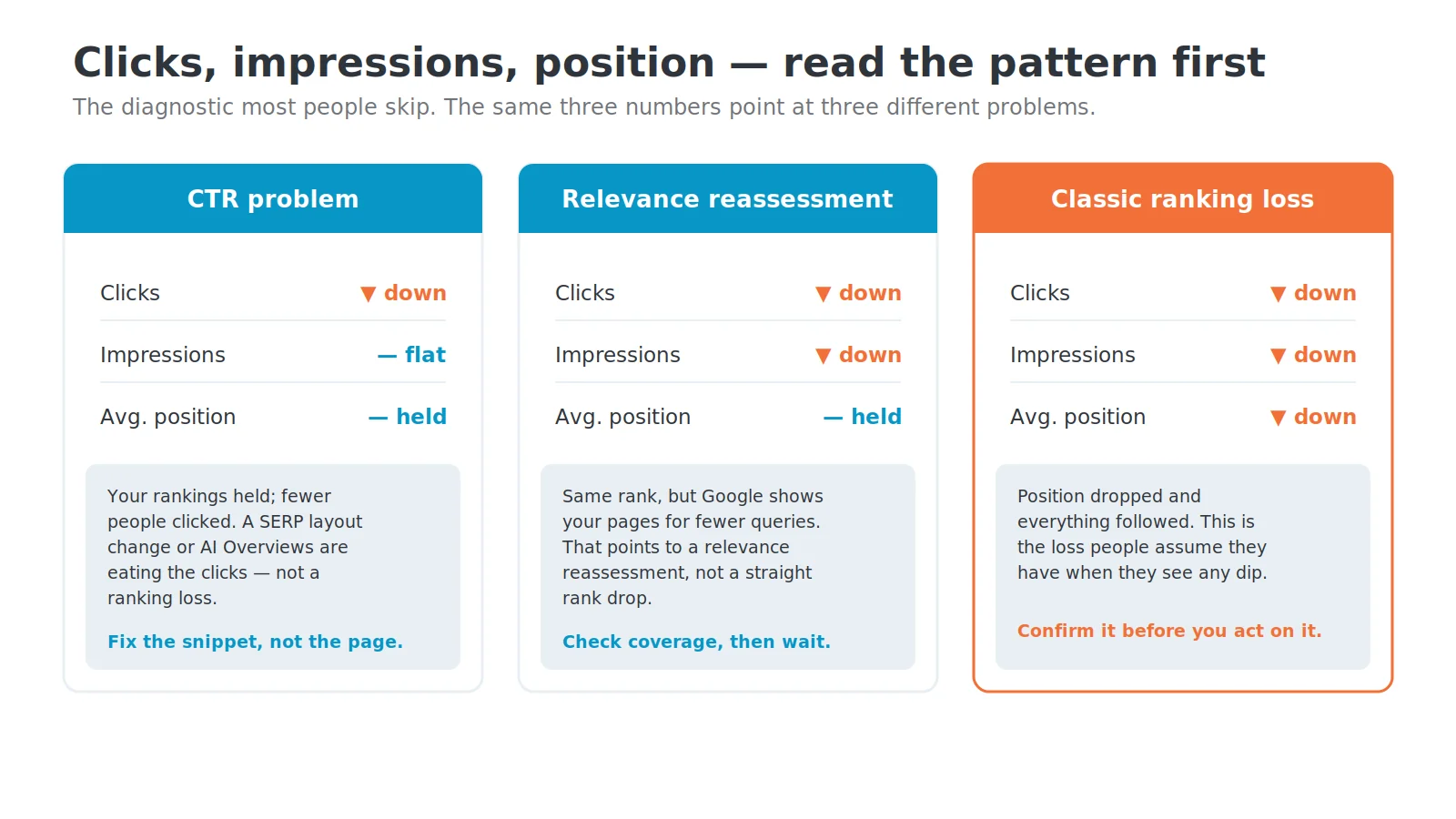
If clicks dropped but impressions stayed flat, your rankings held and fewer people clicked. That’s a CTR problem, possibly from a SERP layout change or new AI Overviews eating your clicks.
If impressions and clicks both dropped while average position stayed the same, Google may be showing your pages for fewer queries.
That points to a relevance reassessment.
If position dropped and everything else followed, that’s the classic ranking-loss pattern most people assume they’re seeing. Confirm it before you act on it.
What not to touch until the picture clears
The worst responses to an unconfirmed update are the ones that feel productive.
They give you the illusion of control while destroying your ability to diagnose what happened.
- Don’t gut content because deleting or heavily rewriting pages removes the version Google ranked, and if the update reverses, you’ve erased the thing that would have recovered.
- Don’t mass-edit title tags since title changes take days to re-index, and you’re layering a new variable on top of an already unclear situation.
- Don’t submit a disavow file because link-based penalties show up in Manual Actions, and disavowing clean links can hurt you.
- Don’t panic-publish because rushing out thin content to ‘fill gaps’ is the opposite of what a quality-focused update rewards.
The standard guidance after any confirmed core update is to wait at least one full week after the rollout finishes before drawing conclusions.
For an unconfirmed update with no announced end date, that waiting period should be longer.
When to act and what action looks like
Waiting doesn’t mean doing nothing forever.
It means waiting until you have two things: a stable data window and a clear pattern.
Give it two full weeks of stable data
Once the volatility calms down across multiple tracking tools, start your analysis.
Two weeks of stable rankings give you a reliable “after” snapshot.
Compare that snapshot against the two weeks before September 2. Same days of week. Same metrics. If you see a clear, sustained shift, now you have something to work with.
Segment before you strategize
Don’t build a recovery plan for your whole site.
Build it for the specific pages and query clusters that lost ground.
Did your informational content drop while transactional pages held? That’s a different fix than if your entire site slid.
Did one subdirectory get hit while others gained?
Sometimes a Google algorithm update reshuffles the deck rather than punishing anyone. Your competitors’ gains might explain your losses better than anything on your own site does. Understanding which Google ranking factors actually shifted keeps you from fixating on the wrong cause.
Eric’s own read on how search is shifting under AI, and where the durable traffic is going:


Protect your baseline and wait for clear signals
Every unconfirmed Google algorithm update triggers the same cycle. Traffic drops. Twitter lights up. Agency owners start rewriting pages.
Three weeks later, half the changes get rolled back because the data didn’t support them.
The sites that recover fastest from confirmed updates are almost always the ones that waited for clear data before touching anything. That’s operational discipline.
Your Search Console data from early September is evidence. Treat it that way. Document what you see, compare it properly, and resist the urge to “fix” something before you’ve confirmed it’s broken. When the picture clears and you have a stable two-week window, segment your losses by page type and query cluster, then build a recovery plan around what the data actually shows.
Get a second set of eyes on your September data
If your early-September traffic shifted and you want a clear read before making any changes, the SEO team at Single Grain can audit your Search Console data and tell you whether you’re looking at an algorithm shift, seasonal noise, or something else entirely.


